

How to Create Marketplace Product Photos with AI: Nano Banana 2 and Iris Guide
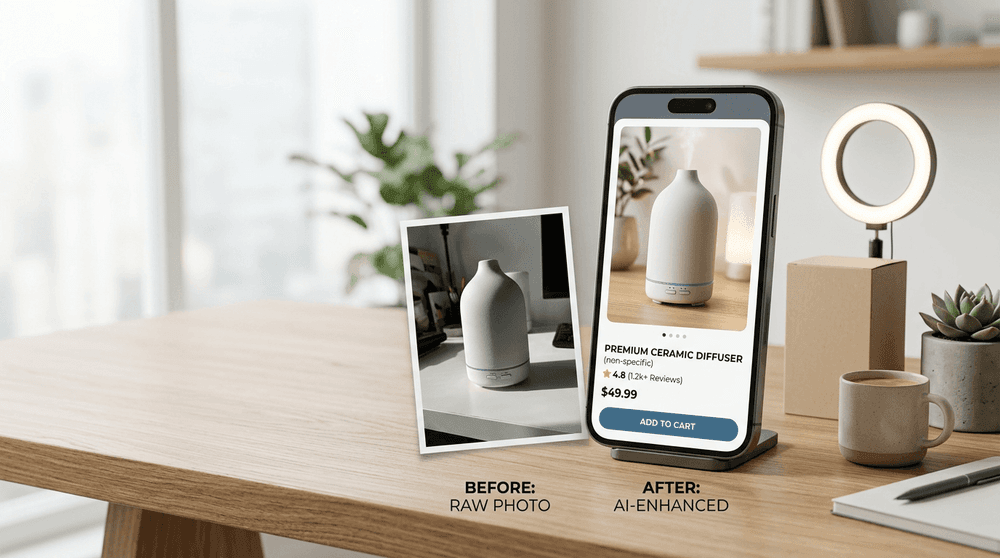
A product listing starts selling before a shopper reads a single bullet point. The image does the first job: it shows the product, its material, scale, use case, and visual quality. Traditionally, that means a studio, lights, retouching, props, models, and a long production cycle.
AI changes the workflow. It does not replace the product itself, but it can help sellers create cleaner product shots, lifestyle visuals, detail close-ups, seasonal creatives, and listing-ready image sets much faster.
Riser brings multiple AI models into one workspace, including Gemini 3.1 Flash Image — known as Nano Banana 2 — plus Iris the Illustrator, a visual-focused AI persona. Iris is currently presented as a Nano Banana Pro-powered assistant built for image creation, composition, reference-based work, and marketing visuals.
The rule is simple: never let AI invent product features. Your listing images should preserve the real product’s shape, color, material, dimensions, logo, and included accessories. Use AI to improve presentation — not to misrepresent the SKU.
Why Nano Banana 2 Works for E-Commerce Images
Nano Banana 2 is Google’s Gemini 3.1 Flash Image model. It is designed for fast image generation and editing, precise instruction following, visual consistency, reference-image workflows, and rapid iterations. For marketplace sellers, that means you can test multiple backgrounds, lighting setups, product compositions, and campaign ideas without rebuilding every image from scratch.
Within Riser, Nano Banana 2 is available as Gemini 3.1 Flash Image, while Iris provides a ready-to-use visual workflow with preconfigured instructions and image-generation scenarios. Use Nano Banana 2 when speed and multiple variations matter; use Iris when you want an AI illustrator that understands a practical marketing brief.
The 6 Product Images Every Marketplace Listing Needs
A strong product listing should usually include more than one white-background image. Build a compact but useful visual set:
-
Hero product image
The clean primary image. Make the product instantly understandable. -
Texture or detail close-up
Show stitching, fabric, coating, hardware, packaging, surface finish, or material quality. -
Lifestyle photo
Place the product in a believable daily-use setting: a kitchen, living room, desk, bathroom, or outdoor scene. -
Scale image
Help customers understand size with hands, a person, or a relevant real-world setting. -
What’s-in-the-box image
Display the actual product, packaging, and included accessories. -
Seasonal campaign image
Add a subtle holiday, summer, gifting, or back-to-school mood without distracting from the item.
Iris includes an e-commerce example built around a six-image sequence: hero photo, macro texture image, in-use shot, contents flat lay, packaging photo, and a seasonal variation.
How to Create Product Images in Riser
Step 1. Upload a clean reference photo
Start with a real photo of your product. A phone photo is fine if the product is visible and the lighting is reasonably even.
For the best AI product photography result, make sure that:
- the whole product is visible;
- the true color is not distorted by filters;
- key materials and details can be seen;
- the product separates clearly from the background;
- you have extra angles for complex products.
Step 2. Choose Nano Banana 2 or Iris
Choose Nano Banana 2 when you need to generate several fast variations: different environments, backgrounds, lighting, crops, or compositions.
Choose Iris the Illustrator when you want a more guided e-commerce workflow. Iris includes practical conversation starters such as turning a product photo into a professional Amazon or Shopify listing image, creating a lifestyle scene, or producing a seasonal product creative.
Step 3. Set the visual parameters before generating
Use the image interface to select the desired picture settings and define the composition before you generate. For marketplace content, these formats are usually the most useful:
- 1:1 for square catalog images;
- 4:5 for vertical product cards and mobile-first listings;
- 16:9 for storefront banners and ad creatives;
- 9:16 for Stories, Reels, and vertical social content.
The marketplace image examples used in Iris are built in a 4:5 ratio — a solid choice for vertical product presentation.
Step 4. Edit the reference photo directly in the input field
Instead of describing everything from scratch, upload your reference and select the exact area that needs work. This gives you tighter control over the result.
Useful requests include:
- replace the background while keeping the product unchanged;
- remove glare from packaging;
- sharpen only the label or product surface;
- isolate one item from a flat-lay image;
- add a realistic interior around the same product;
- improve resolution;
- create a separate marketplace image from a clothing or accessory reference.
Riser’s Iris examples show area selection, image-quality enhancement up to 4K, and reference-based extraction of a product for a standalone marketplace image.
The Product Photography Prompt Formula
A good prompt is a short creative brief, not a pile of random adjectives.
Prompt structure:
Create [image type] for [product]. Keep [color, shape, material, logo, proportions, included items] unchanged. Composition: [angle]. Background: [description]. Lighting: [description]. Style: [description]. Aspect ratio: [ratio]. Do not add [watermarks, random text, extra objects, altered details].
Ready-to-Use Prompts for Nano Banana 2 and Iris
1. Clean marketplace hero image
Create a clean primary marketplace product image from the uploaded reference photo.
Keep the product’s original shape, proportions, real color, material, texture, and logo unchanged.
Place the product in the center on a clean light background with soft studio lighting and a subtle natural shadow.
Premium product photography, high detail, aspect ratio 4:5.
Do not add text, watermarks, unrelated objects, extra logos, or altered product details.
2. Lifestyle product photo
Use the uploaded product photo as an exact reference. Create a realistic lifestyle image of [PRODUCT] in a modern, cozy [KITCHEN / LIVING ROOM / BATHROOM / HOME OFFICE].
The product must remain identical to the original: same color, material, shape, dimensions, and visible details.
Natural window light, premium but believable composition, lived-in background without visual clutter.
E-commerce photography, realistic materials, aspect ratio 4:5, no text, no watermark.
3. UGC-style in-use photo
Create a realistic UGC-style smartphone photo using the uploaded product as the reference.
Show a person naturally holding or using [PRODUCT] in a home environment.
Keep the product exactly consistent with the original reference: no changes to its color, shape, branding, or details.
Soft natural daylight, realistic hands and skin texture, slightly imperfect casual phone framing, product in clear focus.
Aspect ratio 4:5. No watermarks, no random text, no extra products.
4. Material detail or macro shot
Create a detailed macro product photograph based on the uploaded reference.
Show a close-up of [MATERIAL / TEXTURE / STITCHING / HARDWARE / SURFACE FINISH].
Preserve the actual color and material properties. Use soft studio lighting, high sharpness in the focal area, and premium e-commerce product photography style.
Aspect ratio 4:5. Do not add fictional details, text, or logos.
5. Seasonal marketplace creative
Create a seasonal advertising product image from the uploaded reference for [CHRISTMAS / SUMMER / MOTHER'S DAY / BACK TO SCHOOL].
Keep the product 100% recognizable and accurate: preserve its real shape, color, material, size, packaging, and logo.
Add minimal tasteful seasonal decor, soft cinematic lighting, and a clean composition with the product as the main focus.
Aspect ratio 4:5. No discounts, price tags, watermarks, or text.
Common AI Product Photography Mistakes
- Writing vague prompts such as “make it beautiful.”
- Forgetting to state that product color, material, and proportions must remain unchanged.
- Adding too much decorative text directly in the generated image.
- Overloading the scene with props.
- Showing accessories or features that the buyer will not actually receive.
- Publishing without comparing the AI image with the real product and the marketplace’s current listing rules.
Final Takeaway
AI product photography is not about faking a product. It is about presenting a real product in more useful, polished, and conversion-friendly ways. Nano Banana 2 is well suited to quick iterations, reference-based image editing, and creative testing. Iris in Riser works as a focused AI illustrator for product listing images, lifestyle scenes, visual series, and marketing creatives.
Riser combines models and task-specific personas in one chat interface, shows an estimated cost before sending a request, and supports image-focused workflows without requiring separate subscriptions for each AI tool.